That Is My Name

You Can See That

English Department C

My Community

Ways of Life

Keep Fighting

A Motivation

Keep Spirit Helmi

Try And Pray

God With Us

May 25, 2022

My Short Story.

Hi, I am Helmi Syafrizal. I was born from a simple family who love each other. In my family, I am the second child of seven children. I have four brothers and two sisters. I am the one who has a high motivation and ambition in working and learning something, it can be seen when I was a child. When I was junior high school, I studied in MTS AL-HUDA as a humble student and a cheerful student. Besides I studied in the school, I started to work as a labor and also help my parents in selling clothes and shoes to the people around my house, with the aims to help the economics of my family.
After graduating from junior high school, I continued to study in senior high school. I studied in BUDI UTOMO high school which is located in Jombang, East Java. There I met a lot of different people from Sabang to Merauke who had different character and different culture. I have so many friends not only from my place (city) but also I have so many friends from different city, different province, and different island. From that situation, my friends and I can share each other about our character, our culture, and our daily life when we live in our place. Finally, in June 2007, I graduated from high school with a lot of memories and experiences.
After graduating from senior high school, actually I wanted to continue my study at the university level, but unfortunately I did not have some money, and finally, I decided went to Metro-Lampung to work. In Lampung I faced new condition, new place, and new people. There I have to adapt with new condition and new friends, but I was so glad because they can accept me as their friend. In Lampung I dedicated myself as a religion teacher. I taught the people around I live on about the real meaning of religion, what the purpose of life, and the meaning of life. Alhamdulillah they can accept what I conveyed to them. Besides being a religion teacher, I also worked in motorcycle service. I have to work to get some money to finance my life.
After two years I lived in Lampung, finally in 2010 I went home. I decided to continue my study at the university level. At the time, I was accepted in PAKUAN University in Bogor, I was accepted as a student of English education study program. I was so grateful because I can continue my study. Besides being a student, I also worked in PGRI (Organization) as an operator and as an assistant in managing the salary data of all teachers in one sub district. After two years I worked in PGRI, I decided to resign, because my class schedule was full. To get some money, I finally became a freelancer as a photographer, design logo, and service the computers (hardware and software). The last, I worked as an assistant teacher in Junior high school.
Day after day, I spent the time to study and work, and I finished my study by arranging a paper entitled “An Analysis Study of English Needed by The Students of Computer Science”. After through a long journey, finally In February 5th 2016, I graduated and became a scholar with GPA 3.08.

I have to continue my life to creat good values for my religion, my family, my country, and my life, then build my bright future.


Thank you.


 Here is my Curriculum Vitae

Apr 27, 2020

Descriptive Text


Dalam Bahasa Inggris terdapat beberapa jenis teks yang sering muncul pada bagian membaca/ reading comprehension contohnya seperti descriptive text, narative text, recount text, report text, dan jenis text yang lainnya. English Café Bali sudah pernah membahas salah satu jenis teks dalam Bahasa Inggris yaitu narrative text.
Kali ini, kita akan belajar mengenai descriptive text. Selain mengulas mengenai pengertian descriptive text dalam bahasa inggris beserta contohnya, informasi mengenai fungsi, struktur teks, dan juga unsur kebahasaan dari descriptive text tersebut juga akan dibahas. Agar kalian tidak penasaran dengan descriptive text, yuk simak baik-baik artikel English Cafe Bali kali ini tentang pengertian descriptive text dalam Bahasa Inggris beserta contohnya.
1. Definisi dan fungsi Descriptive text. 
Descriptive text adalah suatu jenis teks yang bertujuan untuk menjelaskan atau mendeskripsikan orang, binatang, tempat ataupun suatu benda. Umumnya, yang dideskripsikan adalah bentuk, ciri, ataupun sifatnya.
2. Struktur teks (generic structure).
Adapun struktur dari descriptive text adalah sebagai berikut:
  • Identification: pengenalan objek atau hal yang akan dideskripsikan.
  • Description: penginformasian ciri-ciri objek, misalnya sifat-sifat psikologis perilaku, tampilan fisik, dan yang lainnya secara spesifik.
3. Unsur kebahasaan.
Descriptive text biasanya menggunakan unsur kebahasaan sebagai berikut:
  • Noun: kata benda yang spesifik, misalnya my best friend, my dog, Borobudur Temple, dan lain – lain. Selain itu, terkadang juga menggunakan kata benda yang mendapat pemberian kata sifat, misalnya an intelligent student dan a big garden.
  • Simple present tense: menggunakan kata kerja bentuk pertama (verb1) dan juga kata kerja yang dapat menggambarkan keadaan objek atau mengisyaratkan kepemilikan, misalnya my house has 2 living rooms, Sinta is beautiful, dan lain – lain.
  • Adjective: kata sifat digunakan untuk menjelaskan objek.  
  • Figurative language: menggunakan bahasa figuratif seperti simile atau metafora sebagai cara untuk memberikan ilustrasi perbandingan, misalnya:
          My throat is as dry as a dessert (tenggorokanku sekering gurun).
         Her skin is as white as cloud and smooth as water (kulitnya seputih awan dan selembut air).
Itulah penjelasan mengenai definisi, fungsi, struktur teks, dan juga unsur kebahasaan dari descriptive text. Silahkan baca salah satu contoh descriptive text pada bacaan dibawah ini untuk menambah pemahaman kalian dan cobalah untuk melihat kalimat mana yang mengandung descriptive text.
My Best Friend, Ernesto
I have a best friend. His name is Ernesto and he is my classmate. We go to school together.
Ernesto comes from an educated family. His father is a school principal and his mother is also a teacher.
He is punctual, well-educated, and has good manners. He is really hard working. He always does his homework. He is also well-dressed and well-behaved. All teachers have a high opinion of him. Ernesto has a well-built body. He is gentle but fearless. Moreover, Ernesto takes part in all sports, scout, trekking and mountaineering activities. He has a good heart and he is truthful.
He also plays the guitar, and he makes his parents very proud of him. He secures good marks and is usually top of his class in examinations. He inspires me to work harder. He keeps me away from bad company. I am happy to have such a friend.

* Tugasnya merangkum materi di atas dan tulis contohnya.
* Buat sebuah teks deskriptive tentang apa saja.
* Kirim hasil'y via WHATSAPP.

ISI ABSEN DIBAWAH :


#Source

Apr 16, 2020

Materi, Contoh Dialog, dan Soal Latihan 'Expressing Gratitude' dalam Bahasa Inggris

Materi, Contoh Dialog, dan Soal Latihan 'Expressing Gratitude' dalam Bahasa Inggris

Hello guys, back again with me here. Pada kesempatan kali ini kami ingin memberikan contoh ungkapan ekspresi dalam bahasa inggris yaitu Expression of Gratitude. Apasih itu Gratitude? Expression ini tentunya sering sekali kalian ungkapkan setiap hari, misalnya ketika kalian ditolong oleh seseorang kalian mengucapkan terimakasih. Nah situasi tersebut disebut dengan gratitude. Maka, expressing gratitude adalah ungkapan terimakasih kepada seseorang yang telah memberikan sesuatu atau membantu kita dalam masalah.

Selanjutnya mari kita simak apa saja kalimat 'terimakasih' yang bisa diucapkan dalam bahasa inggris.

Contoh Kalimat Expressing Gratitude

  • Thank you/Thanks (terima kasih)
  • Thank you very much (terima kasih banyak)
  • Thanks a lot (terima kasih banyak)
  • I am grateful for...? (aku berterima kasih untuk...)
  • I want to thank you for you to help me (aku ingin berterimakasih kau mau menolongku)
  • I really appreciate your kindness (aku sangat menghargai kebaikanmu)
  • You have been really helpful for me (kamu sudah sangat membantu untukku)
  • I just can't thank you enough (seberapa banyak kata terimakasih pun takkan cukup)
  • It means a lot for me (ini berharga sangat banyak untukku)
  • I can't repay you for what you've done (aku tidak bisa membayarmu untuk apa yang sudah kamu lakukan)

Response
  • My pleasure. (dengan senang hati)
  • You’re welcome. (sama-sama)
  • No problem (tidak apa apa)
  • I’m glad that i can help you. (aku senang bisa membantumu)
  • Don't mention it (tidak masalah)
  • Forget it. (lupakanlah)
  • That’s what friends are. (itulah arti teman)
  • It’s all right. (baiklah)
  • It’s nothing. (tidak apa-apa)
  • That’s okay. (ok)
Nah, setelah kalian menyimak contoh kalimat expressing gratitude diatas. Mari kita pelajari contoh dialognya juga di bawah ini.

Contoh Dialog Expressing Gratitude:

Bagus : Arif, I gotta go now.
Arif : But the party’s just started, Bagus.
Bagus : I know. But I have to get up very early tomorrow. Thanks a lot for this amazing party.
Arif : You’re welcome. I may throw another one next week.
Bagus : That would be great. Your parties are famous all around the campus.
Arif : Make sure you are free next Sunday.
Bagus : I will. Thanks again, man. See you tomorrow.

Terjemahan:

Bagus: Arif, aku harus pergi sekarang.
Arif: Tapi pesta baru saja dimulai, Bagus.
Bagus: Aku tahu. Tapi aku harus bangun pagi-pagi besok. Terima kasih banyak untuk pesta yang menakjubkan ini.
Arif: Terima kasih. Aku mungkin akan mengadakan pesta lagi minggu depan.
Bagus: Itu akan luar biasa. Pestamu adalah yang terkenal di seluruh kampus.
Arif: Pastikan kamu libur minggu depan.
Bagus: Tentu saja. Terima kasih lagi, bro. Sampai jumpa besok.


Cukup sekian Materi, Contoh Dialog, dan Soal Latihan 'Expressing Gratitude' dalam Bahasa Inggris. Semoga dapat bermanfaat bagi kalian semua.Thank you for reading, I'm really grateful.


ABSEN :


  #Source

Apr 9, 2020

Narrative Text


What is Narrative Text?


Narrative text is a kind of text to retell the story that past tense. The purpose of the text is to entertain or to amuse the readers or listeners about the story.

The generic structure of Narrative text :

  1. Orientation : It set the scene and introduce the participants (it answers the question : who, when, what, and where).
  2. Complication : Tells the problems of the story and how the main characters solve them.
  3. Resolution : The crisis is revolved, for better or worse.
  4. Re-orientation : The ending of the story. Maybe, happy ending or sad ending.
  5. Evaluation : The stepping back to evaluate the story or the moral message of the story

Linguistic features :

  1. Use active verbs.
  2. Use past tense.
  3. Use conjunction (and, then, after that, next, etc) - Also Temporal conjunction, like: once upon a time, one day, long time ago.
  4. The first person (I or We) or the third person (He, She, or They).
  5. Use specific nouns.
  6. Use adjective and adverbs

Kind of Narrative text :

  1. Legend : Sangkuriang, Malin Kundang, etc.
  2. Fable : Mousedeer and crocodile.
  3. Fairy tale : Cinderella, Snow white, Pinocchio, etc.
  4. Folktale
  5. Short story
  6. Real-life drama
  7. Classic
  8. Fantasy
  9. Adventure
  10. Science Fiction
  11. Myth
  12. Mystery

Examples of Narrative Text:


The Legend of Surabaya

A long time ago, there were two animals, Sura and Baya. Sura was the name of a shark and Baya was a crocodile. They lived in the sea.

Once Sura and Baya were looking for some food. Suddenly, Baya saw a goat “Yummy, this is my lunch,” said Baya. “No way! This is my lunch. You are greedy” said Sura. Then they fought for the goat. After several hours, they were very tired.

Feeling tired of fighting, they lived in the different places. Sura lived in the water and Baya lived in the land. The border was the beach, so they would never fight again.

One day, Sura went to the land and looked for some food in the river. He was very hungry and there was not much food in the sea. Baya was very angry when he knew that Sura broke the promise. They fought again.

They both hit each other. Sura bit Baya’s tail. Baya did the same thing to Sura. He bit very hard until Sura finally gave up and went back to the sea, and Baya was happy.


Tugas:

- Tulis materi dan teks di atas di buku catatan masing-masing
- Baca text diatas *The Legend of Surabaya* dengan keras
- Rekam menjadi sebuah audio
- Kirimkan hasil audio pada Bp Helmi
- Format tugas : Nama lengkap & Kelas + Rekaman
- Teakhir pengumpulan hari minggu malam
- Kirim Via WA / Chat Group.

No WA           : 0897 6997 173

ISI ABSEN / BIODATA
*Tidak mengisi biodata berati tidak absen (ALFA), Walaupun mengirimkan tugas lewat WHATSAPP.

Apr 23, 2018

Cara Aktivasi Corel Draw X7

Cara Aktivasi CorelDraw X7 Full Version mungkin sebagian dari Kamu merasa bingung, Nah pada postingan kali ini saya akan membahas mengenai Aktivasi CorelDraw X7 Full Version menggunakan keygen.
Pertama Anda harus mendownload CorelDraw X7 terlebih dahulu apabila belum punya silahkan download disini , Setelah itu ikuti langkah-langkah dibawah ini untuk mengaktivasi CorelDraw X7

  1. Download Keygen CorelDraw X7 Download Disini
  2. Matikan Sofware Antivirus (Wajib)
  3. Jalankan file installer CorelDraw X7 yang telah didownload
  4. lalu jika Installer CorelDraw X7 tidak menampilkan teks klik pada tulisan "To help protect your security" lalu pilih "Allow Blocked content"
  5. Pada halaman agreement centang I Accept terms in the license agreement lalu klik Next
  6. Jalankan keygen yang sudah didownload(Jangan ditutup sampai langkah instalasi pada blog ini sudah selesai anda praktekkan). Pada bagian Select a product pilih CorelDraw Graphic Suite X7
  7. Lalu copykan serial number yang tertera pada keygen tekan CTRL+C
  8. pada CorelDraw pilih I have a serial number or subscription code lalu pastekan serial number CTRL+V yang tadi sudah dicopy dari keygen ke textbox yang tersedia setelah itu klik Next
  9. Pilih Typical installation
  10. Setelah proses instalasi selesai klik Finish
  11. Setelah itu jalankan CorelDraw X7 yang sudah terinstall
  12. Klik Contact Corel
  13. Lalu copykan installation code yang tertera ke keygen, lalu klik Generate Activation code
  14. Lalu copykan Activation code yang tertera pada keygen ke jendela aktivasi CorelDraw,lalu klik Continue jika ada notifikasi Invalid serial bla.. bla.. bla../ notifikasi error biarkan saja :)
     
Selesai.. Full version.. 

Feb 10, 2018

Cara Mudah Membuka Proteksi Password Microsoft Office Excel Tanpa Software

Untuk mengamankan file Office Excel agar tidak sembarangan orang bisa mengubah datanya maka kita proteksi dengan membuat password. Karena jika file Office Excel telah dibenamkan password (Protect Sheet) didalamnya maka sedikitpun orang lain tidak akan bisa mengubah file tersebut kecuali mengetahui passwordnya. Lalu bagaimana jika suatu saat kita sendiri lupa akan password tersebut? Sehingga kita sendiri kesulitan untuk kembali mengubah (edit) file Office Excel. Jangan khawatir karena disini saya akan memberikan cara mudah untuk membuka kembali proteksi password file Office Excel tersebut. Cara ini sama sekali kita tidak perlu menggunakan software lainnya. Kita cukup menggunakan Microsoft Office Excel untuk melakukan Unprotect Password tersebut.
Banyak alasan untuk membuka proteksi password Office Excel, misal seperti yang sudah diterangkan diatas karena lupa. Atau bahkan mungkin kita menemukan file Office Excel yang harus kita edit datanya sedangkan file tersebut diproteksi oleh orang lain. Kemudian kita kesulitan untuk menanyakan password tersebut kepada orang yang telah membuat passwordnya. Maka solusi satu-satunya adalah dengan melakukan cara yang akan saya bahas disini.
Membuka Proteksi Password Office Excel (1)
Yang kita butuhkan untuk melakukan Unprotect Office Excel hanya serangkaian script atau kode saja. Kode tersebut berfungsi untuk menghilangkan proteksi pada file Office Excel. Cara kerjanya sangat simple dan tidak akan membutuhkan waktu lama untuk melakukannya.

Berikut Cara Membuka Proteksi Password Office Excel Tanpa Software

Biasanya jika kita membuka file Office Excel yang telah ditentukan password (proteksi) didalamnya maka ketika kita melakukan klik ganda pada salah satu kolom layar kerja maka akan tampil peringatan seperti ini :
Membuka Proteksi Password Office Excel (2)
Itu tandanya adalah file Office Excel yang sedang kita buka telah diproteksi oleh pembuatnya. File tersebut sama sekali tidak akan bisa kita edit sebelum kita membuka atau menghilangkan proteksinya. Sementara selama file masih diproteksi, maka file tersebut hanya bisa kita baca dan lihat saja.
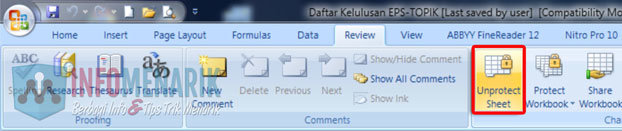
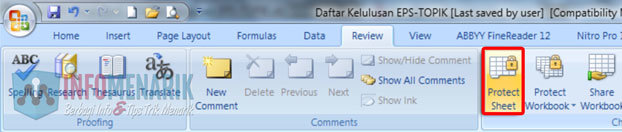
Kemudian jika kita lihat di menu Review maka akan jelas terlihat pada bagian Changes disitu tertera tulisan Unprotect Sheet. Fitur itu fungsinya adalah untuk membuka proteksi password Office Excel. Masalahnya jika kita tahu passwordnya maka tidak akan dipusingkan dengan hal ini. Namun jika sebaliknya kita lupa atau tidak tahu karena file ini dibuat oleh orang lain lalu bagaimana?
Membuka Proteksi Password Office Excel (3)
Santai saja dan saya yakin jika Anda sudah selesai membaca artikel ini maka Anda akan tersenyum sendiri. Karena ternyata untuk mengatasi masalah ini sangatlah mudah.
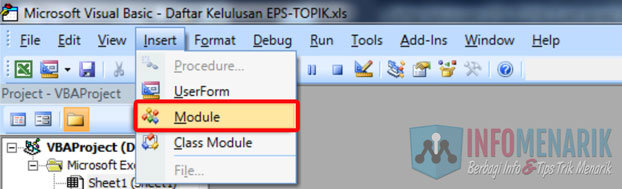
Caranya silakan Anda buka file Office Excel yang telah diproteksi tersebut kemudian Anda tekan Alt+F11 pada keyboard. Fungsi tombol kombinasi Alt+F11 ini adalah untuk mengaktifkan layar kerja Microsoft Visual Basic. Kemudian Anda klik pilih menu Insert dan Module.
Membuka Proteksi Password Office Excel (4)
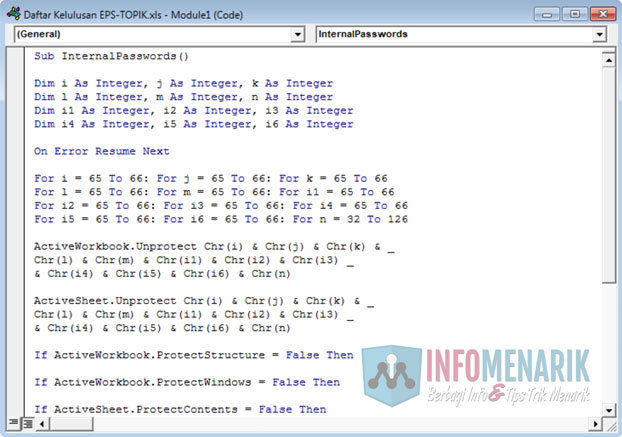
Anda copy kode dibawah ini dan paste-kan pada layar kerja Module yang tadi telah Anda aktifkan.
Sub InternalPasswords()
Dim i As Integer, j As Integer, k As Integer
Dim l As Integer, m As Integer, n As Integer
Dim i1 As Integer, i2 As Integer, i3 As Integer
Dim i4 As Integer, i5 As Integer, i6 As Integer
On Error Resume Next
For i = 65 To 66: For j = 65 To 66: For k = 65 To 66
For l = 65 To 66: For m = 65 To 66: For i1 = 65 To 66
For i2 = 65 To 66: For i3 = 65 To 66: For i4 = 65 To 66
For i5 = 65 To 66: For i6 = 65 To 66: For n = 32 To 126
ActiveWorkbook.Unprotect Chr(i) & Chr(j) & Chr(k) & _
Chr(l) & Chr(m) & Chr(i1) & Chr(i2) & Chr(i3) _
& Chr(i4) & Chr(i5) & Chr(i6) & Chr(n)
ActiveSheet.Unprotect Chr(i) & Chr(j) & Chr(k) & _
Chr(l) & Chr(m) & Chr(i1) & Chr(i2) & Chr(i3) _
& Chr(i4) & Chr(i5) & Chr(i6) & Chr(n)
If ActiveWorkbook.ProtectStructure = False Then
If ActiveWorkbook.ProtectWindows = False Then
If ActiveSheet.ProtectContents = False Then
Exit Sub
End If
End If
End If
Next: Next: Next: Next: Next: Next
End Sub
Membuka Proteksi Password Office Excel (5)
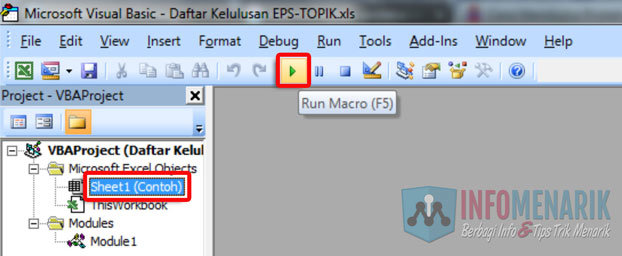
Langkah selanjutnya adalah Anda klik pilih Sheet yang didalamnya terdapat password atau yang akan kita jebol proteksinya. Disini atau dalam contoh saya akan membuka proteksi Sheet yang bernama Contoh.
Kemudian Anda klik pilih lagi tombol Run Macro atau lebih cepat lagi Anda bisa menekan tombol F5 pada keyboard.
Membuka Proteksi Password Office Excel (6)
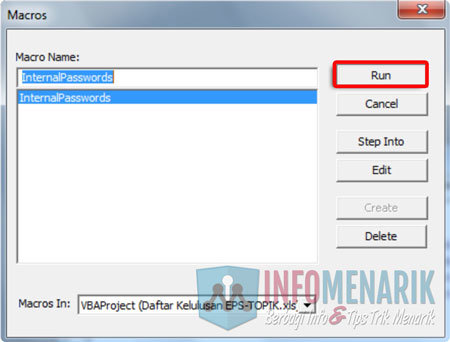
Maka Anda akan dihadapkan pada kotak dialog Macros dengan perintah InternalPasswords. Disini kita tidak banyak yang harus dilakukan, kita cukup klik pilih Run. Tunggu beberapa saat karena kode yang telah kita benamkan pada Module tadi sedang bekerja untuk menghilangkan proteksi file Office Excel. Lamanya proses Run Macro ini tergantung ukuran file Office Excel yang sedang Anda Unprotect.
Membuka Proteksi Password Office Excel (7)
Jika proses Run Macro sudah selesai dengan sempurna, silakan Anda tutup (close) layar kerja Microsoft Visual Basic dan kembali perhatian Anda pada layar kerja Sheet yang semula diproteksi. Anda lihat menu Review, jika sudah berubah menjadi Protect Sheet maka proses membuka proteksi password Office Excel ini telah sukses.
Membuka Proteksi Password Office Excel (8)
Silakan Anda coba untuk mengedit atau melakukan perubahan pada layar kerja file Office Excel tersebut. Saya yakin sekarang file Office Excell sudah tidak diproteksi lagi.
Bagaimana mudah bukan? Silakan selamat mencoba trik Membuka Proteksi Password Office Excel ini. Semoga Anda berhasil melakukannya dan saya harap gunakan trik ini untuk tindakan yang baik bukan untuk menjebolkan file Office Excel orang lain yang dilindungi dengan proteksi. Salam hangat dan sampai bertemu di artikel menarik lainnya.


#Source